Boghota: An Elegant Script Font for Web Design
I was recently tasked with refreshing the landing page for a boutique coaching brand that wanted to move away from the sterile, corporate look typical of the industry. The client desired warmth, approachability, and a touch of high-end sophistication without sacrificing clarity. As I scrolled through my library of premium fonts, searching for a typeface that could carry the emotional weight of their brand story, I landed on Boghota. This lovely and delicate script font immediately caught my eye, promising the elegance and class the project demanded. After integrating it into several key sections of the site, I can confidently say that Boghota is a standout choice for digital creators who need a beautiful and refreshing look.
Visual Personality and Digital Charm
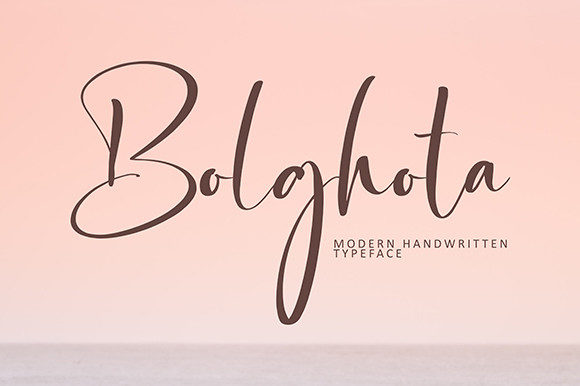
Boghota is not just another script; it is a carefully crafted typeface that balances fluidity with structure. Its visual personality is defined by smooth, continuous strokes that mimic natural handwriting but with a polished, professional finish. In a web design context, this translates to a font that feels personal yet authoritative. The delicate nature of the letters adds a layer of refinement that is often missing in standard web-safe options.
When used in a hero section or as a primary headline, Boghota exudes a mood of calm confidence. It does not shout for attention; instead, it invites the user to lean in and read. This makes it an excellent candidate for brands in the lifestyle, wellness, fashion, and creative sectors. The font’s charm lies in its ability to soften the rigid grid of a website layout, creating a more organic and enjoyable user experience. For designers looking to elevate their brand identity, Boghota offers a unique blend of modern typography and classic script aesthetics.
Strategic Placement in Web Layouts
One of the most critical decisions in web design is knowing where a decorative font belongs. Boghota is undeniably a display font. It shines brightest when used for short phrases, titles, and impactful statements. During my testing, I found it particularly effective in the following areas:
- Hero Headlines: Using Boghota for the main value proposition on a landing page creates an immediate emotional connection. It breaks the monotony of bold sans-serif headers and adds a human touch.
- Section Dividers: Small, elegant words like "Welcome," "Our Story," or "Services" look stunning in Boghota, acting as visual breathers between content blocks.
- Testimonial Highlights: Placing a client’s name or a key quote in this script font adds authenticity and prestige to social proof sections.
- Digital Ads and Social Graphics: When creating assets for social media graphics or paid campaigns, Boghota helps the brand stand out in a crowded feed due to its distinctive style.
However, it is crucial to recognize what this font is not suited for. Boghota should never be used for long body copy, navigation menus, form labels, or dense dashboard interfaces. Its decorative nature reduces readability at small sizes and in high-density layouts. For these elements, always pair it with a clean, highly legible font to ensure accessibility and usability.
Readability and Responsive Considerations
In the era of mobile-first design, testing how a script font renders on smaller screens is non-negotiable. Boghota performs surprisingly well on mobile devices, provided it is used correctly. The key is scale. On desktop, you might use it at 60px or larger for maximum impact. On mobile, you may need to adjust the size and line height to ensure the delicate loops and tails do not overlap or become illegible.
I tested Boghota over various background types, including solid colors, subtle gradients, and photographic images. It maintains its clarity best on high-contrast backgrounds. When placing it over busy images, adding a slight drop shadow or a semi-transparent overlay can help preserve the integrity of the letterforms. For dark mode interfaces, ensure the stroke weight remains visible; sometimes, very thin scripts can disappear against dark backgrounds if not adjusted properly.
Accessibility is also a major concern. While Boghota is beautiful, it should not be the sole carrier of critical information. Always ensure that there is sufficient color contrast between the text and the background. For users with visual impairments, decorative scripts can be challenging to parse, so reserve Boghota for aesthetic enhancement rather than functional navigation.
Mastering Font Pairing for Brand Consistency
The true power of Boghota is unlocked through strategic font pairing. A script font of this caliber needs a supportive partner to create a balanced visual hierarchy. In my recent project, I paired Boghota with a geometric sans serif font for the body text and subheadings. This combination created a modern, clean look that allowed the script to shine without overwhelming the user.
Alternatively, for a more editorial or luxury feel, pairing Boghota with a classic serif font can evoke a sense of tradition and trustworthiness. This works exceptionally well for online stores selling artisanal goods or high-end services. The contrast between the flowing curves of the script and the structured lines of the serif or sans serif creates a dynamic tension that keeps the eye engaged.
When selecting a pairing font, consider the x-height and weight. A light or regular weight sans serif usually complements Boghota best, as a heavy bold font might compete for attention. The goal is harmony, where each typeface plays its role in guiding the user through the content seamlessly.
Technical Implementation and Licensing
Before deploying Boghota on any client website or digital product, it is essential to review the technical specifications and licensing terms. Check if the font package includes webfont formats such as WOFF and WOFF2, which are optimized for fast loading on browsers. Slow-loading fonts can negatively impact user experience and SEO rankings, so ensuring the file size is manageable is crucial.
Also, explore any included alternates, ligatures, or swashes. These features can add variety to your designs, allowing you to customize the look of specific words or initials for a more bespoke feel. However, use them sparingly to maintain consistency across the site.
Finally, always verify the commercial font licensing. If you are using Boghota for a client’s e-commerce site, a course sales page, or a SaaS platform, ensure your license covers web usage and the expected traffic volume. Respecting intellectual property is a cornerstone of professional web design. By understanding these technical and legal aspects, you can use Boghota confidently to create stunning, compliant, and effective digital experiences.
In conclusion, Boghota is a versatile and elegant tool for any web designer’s toolkit. Whether you are designing a portfolio homepage, a boutique online store, or a coaching website, this script font adds a layer of sophistication that resonates with users. By using it strategically, pairing it wisely, and respecting its limitations, you can create digital spaces that are not only visually appealing but also emotionally engaging.